Add an APK
Pick one from Files with +, use “Open with Packet”, share it to Packet, or publish from your Mac.

Coming soon to iPhone and Android
Every phone signed in to the same account sees the same locker, live. Android installs straight from the cloud. iPhone keeps a copy on demand and hands it to an Android phone — over the share sheet or your own WiFi.
Signed out, Packet still works as a local-only locker.
How it works
Your APKs live in your Packet account. The cloud is the source of truth; files on a phone are a cache.
Pick one from Files with +, use “Open with Packet”, share it to Packet, or publish from your Mac.
Label, real icon, version, SDKs, permissions and signing — all read out of the APK itself.
Uploaded to your account and showing on every signed-in phone within about a second.
On Android, tap Install, Update or Open. On iPhone, Share it or send it over WiFi with a QR code.
iPhone & Android
Both apps look the same screen for screen. Where the platforms differ, Packet plays to each one's strengths.
Download on demand with progress; every copy is sha256-verified before it's kept or installed.
iOS can't install APKs, so Packet on iPhone is the carrier: it keeps a copy on demand and passes it to an Android phone.
Inside Packet
Packet lists apps, not files — modelled on an App Store product page, with every version you've kept.
Faster sync on slow networks. New export option. Fixes the widget.
Chrome warns that APKs can harm your device. That warning shows for every APK. The server closes as soon as you leave this screen.
Stop sharing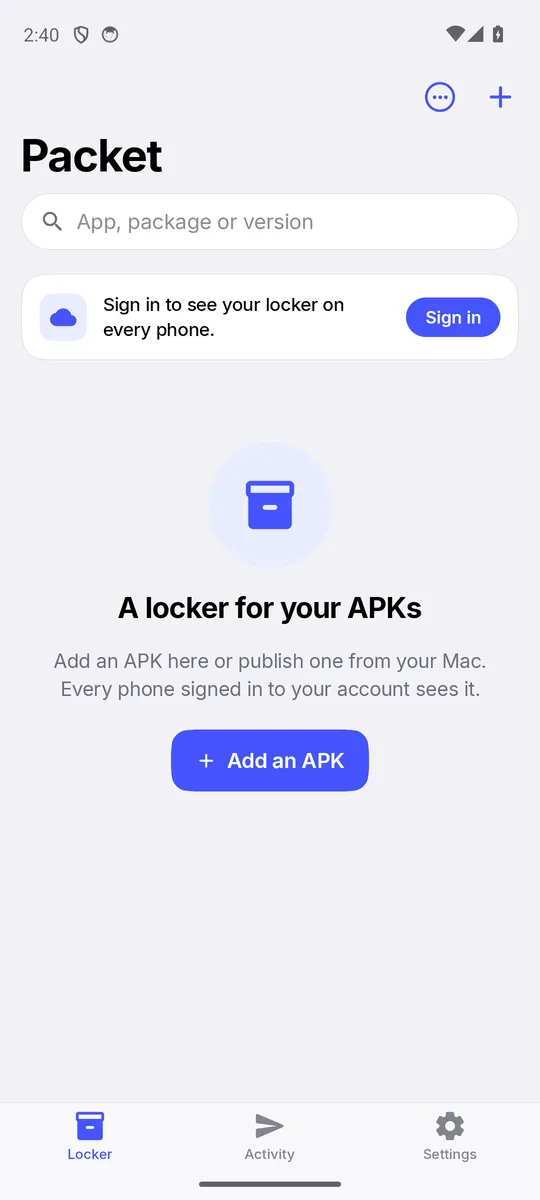
The first two screens are illustrations drawn to match the app's layout; app names are examples. The third is a screenshot of Packet for Android.
APK inspector
Tap any version for everything Packet reads out of the APK — no guessing from file names.
Features
Sign in with email and password or a 6-digit email code. Nothing is deleted because another phone lacks it.
A publish from your Mac or an upload from another phone shows up in the list within a second.
The last 10 versions of each app, newest first, marked Latest
, Installed
or On this phone
.
Launcher icons pulled from the APK — adaptive icons included — or a tinted monogram when there isn't one.
Sends, WiFi hand-offs, publishes, uploads, downloads and installs, grouped by day and labelled with the device.
Hide apps you don't need to see. Sort by name, date added or size. Search by app, package or version.
Two files with the same package id are flagged, and the older copy is marked.
Push a build from your Mac with its release notes, and every phone on your account sees it arrive.
System, Light or Dark — every surface has a hand-picked dark counterpart, on both platforms.
Packet is coming soon to iPhone and Android. Want to hear when it's ready?
Get notified